Overview
SugarMummy is a desktop application used to manage a type-II diabetic lifestyle. The user interacts with it using a CLI, and it has a GUI created with JavaFx. It is written in Java and has about 30 kLOC.
Summary of contributions
-
Major enhancement: added the ability for the application to provide a personalised user experience for the user.
-
What it does: Allows the user to:
-
View, add, edit and clear his / her biography.
-
Attain different levels of achievements upon meeting predefined requirements.
-
Customise font and background to any hexadecimal-value colour (or image for background).
-
-
Justification: These features improve the product significantly because a user would want to add a user profile with useful information especially in times of emergency, acquire a sense of achievement at different milestones, and enjoy a substantial degree of flexibility in aesthetic customisation, representing his / her preferences, that enhances his / her overall quality of comfort in using the app.
-
Highlights: These enhancements benefit commands to be added in future since new fields in a user’s biography, achievements and aesthetic preferences could be easily defined in further developments via inheritance and polymorphism. Implementation of the
Achievementssub-feature was particularly challenging as it required careful interaction with other features such as theAveragefeature andRecordinstances, in addition to maintaining balance between abstraction and minimising coupling.
-
-
Minor enhancements:
-
Added over 600+ motivational quotes from various sources to be selected at random and shown to the user for each session of the main application’s execution.
-
-
Code contributed: [View RepoSense]
-
Other contributions:
-
Project management:
-
Enhancements to existing features:
-
Documentation:
-
Added 90 test situations to the
Instructions for Manual Testingsection part of the Developer Guide. (Pull request #186) -
Updated
Contact Uspage,User StoriesandReferencesin the Developer Guide. (Pull requests #16, #17, #191) -
Updated
Readmeand application screenshots. (Pull requests #22, #163, #220)
-
-
Community:
-
Implemented seamless switching of panes from one feature to another with caching abilities for optimised performance through a helper class with
Suppliermethods for other features' use as well. (Pull request #62) -
Implemented
StyleSheetManagerto add universal aesthetic support for all features, along with common scrollpanes. (Pull requests #92, #94, #194)
-
-
Contributions to the User Guide
Given below are samples of sections I contributed to the User Guide. They showcase my ability to write documentation targeting end-users. The full section of personalised features in the user guide may be accessed here. |
Shows all the achievements that the user has attained: achvm
Format: achvm
Displays the current list of achievements attained by the user, categorised by record type. Each achievement has a picture that represents it, a title, level, state and requirement required to attain the achievement.
…(Click here for more information on the achvm command in the UG.)
Displays the user’s biography': bio
Format: bio
Displays a pane containing user information such as the user’s profile picture, name, NRIC, gender, date of birth, contact number, address and other biography information that the user would like to include.
…(Click here for more information on the bio command in the UG.)
Adds the user’s biography: addbio
Format: addbio n/NAME [dp/DP PATH] [desc/PROFILE DESCRIPTION] [nric/NRIC] [g/GENDER] [dob/DATE OF BIRTH] p/CONTACT NUMBER… e/EMERGENCY CONTACT… m/MEDICAL CONDITION… [a/ADDRESS] [goal/GOAL]… [o/OTHER BIO INFO]
A user may add a biography if there isn’t already an existing one stored in the application. This could occur if the
storage file is corrupted (refer to above sub-section on bio), or if the user decides to clear the biography (refer to
following sub-section on clrbio command). A user may add at most one biography.
In adding a biography, it is compulsory for the user to include the following information (i.e. should not be blank):
-
NAME -
CONTACT NUMBER -
EMERGENCY CONTACT -
MEDICAL CONDITION
Examples of VALID addbio commands, provided that a biography does not yet exist, include:
-
addbio dp//Users/bob/Desktop/doge.png desc/hello world n/testName nric/testNric gender/testGender dob/1920-12-21 p/12343567 p/91234567 e/81234567 m/testMedicalCondition a/example address 123 goal/testGoal o/testOtherInfo(Note: this is provided that the image exists at exactly the SAME PATH in the user’s device. Otherwise, it has to be modifed or removed in order for this example to work) -
addbio n/testMinimal p/91234567 e/81234567 m/testMedicalCondition
…(Click here for more information on the addbio command in the UG.)
Edits the user’s biography: editbio
Format: editbio [n/NAME] [dp/DP PATH] [desc/PROFILE DESCRIPTION] [nric/NRIC] [g/GENDER] [dob/DATE OF BIRTH] [p/[INDEX/]CONTACT NUMBER]… [e/[INDEX/]EMERGENCY CONTACT]… [m/[INDEX/]MEDICAL CONDITION]… [a/ADDRESS] [goal/[INDEX/]GOAL]… [o/OTHER BIO INFO]
A biography can be edited only if one already exists.
If the user intends to edit the second of three phone numbers in a list, he or she may input editbio p/2/1234567 to change the second
number in the list of phone numbers.
Examples of VALID editbio commands, provided that a biography exists, include:
-
editbio desc/hello world n/testName nric/testNric gender/testGender dob/1920-10-08 p/91234567 e/81234567 m/testMedicalCondition a/example address 123 goal/testGoal o/testOtherInfo -
editbio dob/2019-12-28
…(Click here for more information on the editbio command in the UG.)
Clears the user’s biography: clrbio
Format: clrbio
A user may clear his or her biography using the clrbio command. If a biography exists, all data from all biography
fields will be removed. Otherwise, if a biography does not exist, the user will be displayed a message that the biography is
already empty and there is no biography information to clear.
…(Click here for more information on the clrbio command in the UG.)
Sets the font color of the application: fontcolour or fontcolor
Formats:
-
fontcolour COLOUR [bg/BACKGROUND ARGUMENTS]orfontcolor COLOUR [bg/BACKGROUND ARGUMENTS]; or -
fontcolourorfontcolor
To set a colour of a font using a colour name, simply enter fontcolour (or the American spelling fontcolor;
both are recognised by the program) followed by the intended name of the colour. For instance, one may enter:
fontcolour yellow or fontcolor skyblue.
A colour may be set using its hexadecimal value provided it follows format beginning with a '#' followed by six valid
alphanumeric characters representing a hexadecimal colour. For instance, one may enter: fontcolour #FFFF00
or fontcolor #FFFF3A.
Examples of VALID fontcolour (or fontcolor) commands:
-
fontcolour yellow -
fontcolor indigo -
fontcolour #202020
…(Click here for more information on the fontcolour command in the UG.)
Sets the background image or colour of the application: bg
Formats:
-
bg COLOUR [fontcolour/COLOUR]orbg COLOUR [fontcolor/COLOUR]; or -
bg PATH [s/BACKGROUND SIZE] [r/BACKGROUND REPEAT] [fontcolour/COLOUR]orbg PATH [s/BACKGROUND SIZE] [r/BACKGROUND REPEAT] [fontcolor/COLOUR]; or -
bg [s/BACKGROUND SIZE] [r/BACKGROUND REPEAT] [fontcolour/COLOUR]orbg [s/BACKGROUND SIZE] [r/BACKGROUND REPEAT] [fontcolor/COLOUR](only if background is already a background image); or -
bg
Users are allowed to set the background either using a COLOUR or a PATH to a background image.
The COLOUR argument of the background works in exactly the same way as described in the fontcolour or (fontcolor)
sub-section above, except that command word used is now bg instead of fontcolour (or fontcolor).
i.e. a user may enter bg blue or bg #202020 to set the background image.
In addition to specifying a COLOUR, a user may also specify a PATH for background image.
Examples of VALID bg commands:
-
bg yellow -
bg indigo -
bg #202020 -
bg /Users/bob/Desktop/SpaceModified.jpg
…(Click here for more information on the bg command in the UG.)
Contributions to the Developer Guide
Given below are samples of sections I contributed to the Developer Guide. They showcase my ability to write technical documentation and the technical depth of my contributions to the project. The full section of personalised features in the developer guide may be accessed here while that for user stories may be accessed here. |
Personalised User Experience Feature
Overview
-
The
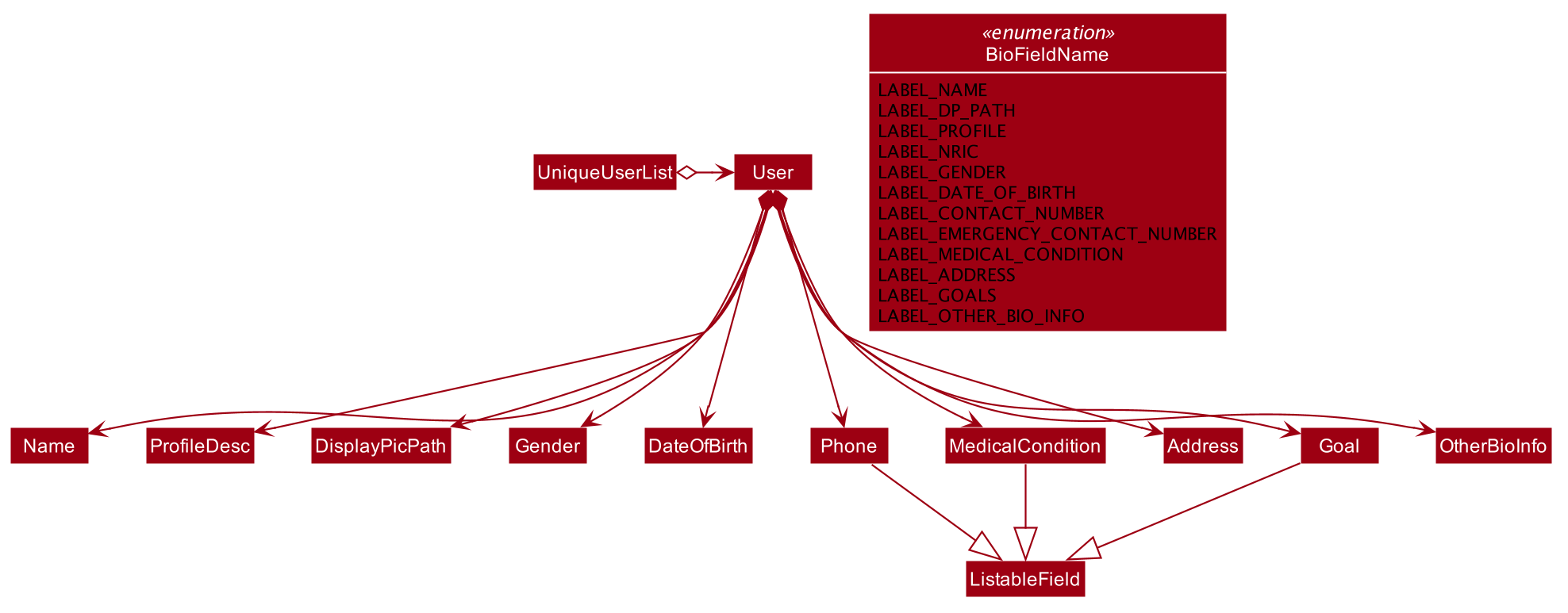
Userclass is used to represent a diabetic user. A diabetic user is composed of theName,ProfileDesc,DisplayPicPath,Nric,Gender,Phone,MedicalCondition,Address,GoalandOtherBioInfoclasses. -
A
Useris currently defined to be able to have more than onePhone,MedicalConditionandGoal. As such, these classes inherit theListableFieldInterface. -
The structure of a
Userand its interactions are shown as follows:
…(Click here for more information on the overview of implementing personalised user experience in the DG.)
Implementation
Biography
The biography feature is supported by the addbio, editbio and clrbio commands.
SugarMummyParser responds to the command word via a series of switch cases.
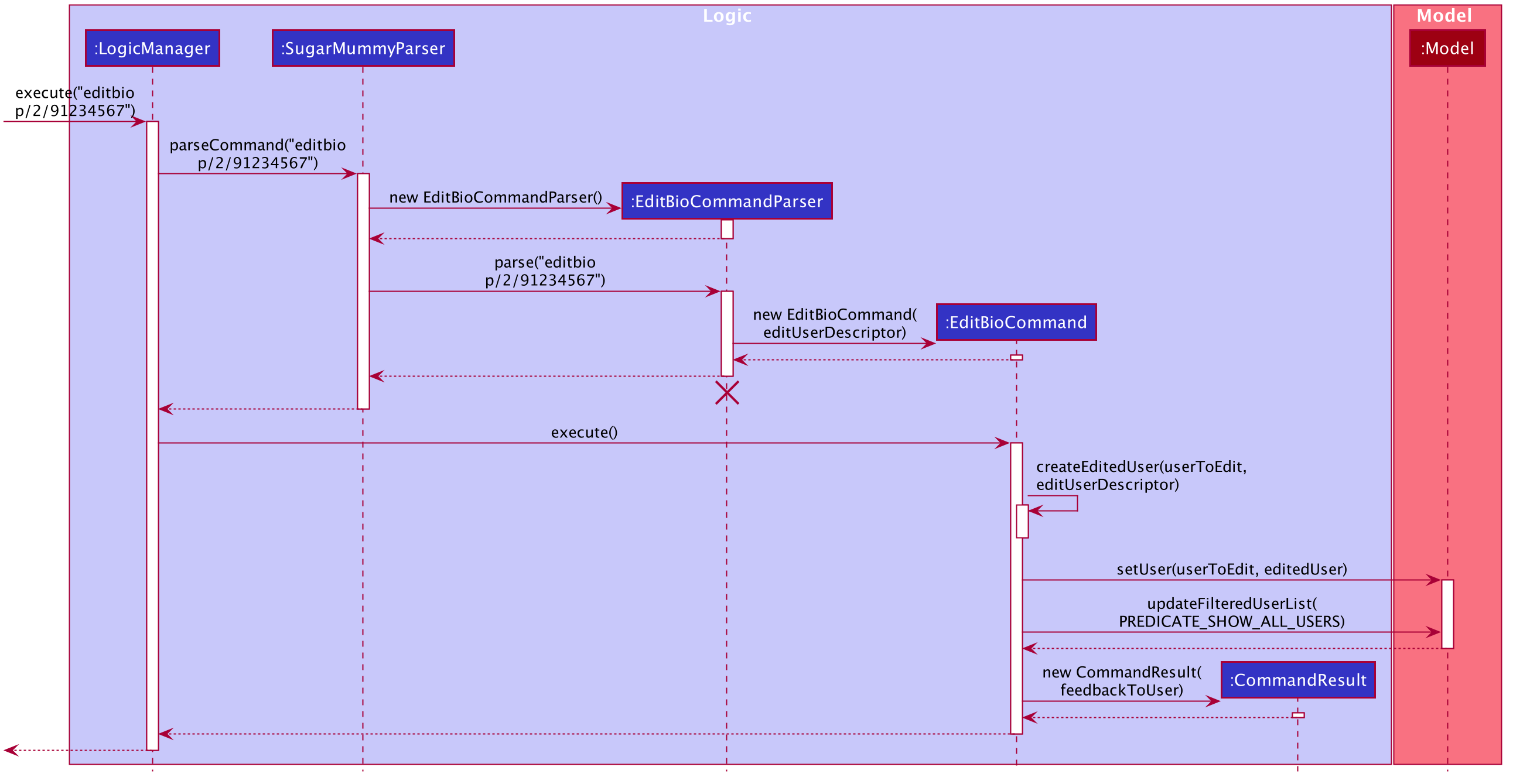
addbio and editbio returns AddBioCommandParser and EditBioCommandParser respectively.
-
CommandParserthen returns anAddBioCommandobject that stores theUserto be created.EditBioCommandParseron the other hand creates anEditBioCommandobject that stores anEditedUserDescriptioncontaining information on which fields are edited to be edited.-
A
ListofHashMapsthat maps indices toListableFieldis used inEditedUserDescriptionto denote changes to be made within eachListableField. When executed byLogicafterwards, theAddBioCommandcreates theUserto be stored in theModelManagerwhereas theEditBioCommandcreates a newUserbased on information inEditedUserDescription. AUserListis used in theModelManagerto storeUserinstances. -
At any point of time when a user attempts to access biography information,
LogicManageraccesses theUserListfromModelManagerto display information. In order to be able to display the same information upon startup,LogicManagersaves thisUserListto the storage after execution of each command.
-
-
For the
bioandclrbiocommands, the implementations are relatively more straightforward.-
A
BioCommandreturned bySugarMummyParsersimply overrides thegetDisplayPaneType()of theCommandobject (that eachCommandobject contains) so that back atUi,Uiknows to display theBioPaneof theUiin theMainDisplayPanepart of the window.
-
-
An illustration of how the information flows for the
editbiocommand is shown as follows:
…(Click here for more information on the implementation of biography features in the DG.)
Aesthetics
The aesthetics aspects of the application help to support the feature of personalised user experience and are
implemented using the command words fontcolour and bg respectively.
Colour and Background are independent classes, and Colour makes use of enumerations of colour names and
hexadecimal colour codes to determine validity of the colours.
-
Upon receival of the command
fontcolour, iffontcolourhas no arguments (checked byFontColourParser), a newFontColourCommandwith no arguments is returned, and upon execution return aCommandResultthat shows the existingfontcolourused via access ofModelManager(logic is similar to the ones for biography)-
Otherwise if arguments are received, validity of the arguments is checked against, and if the colour is a valid
Colour, it is set inModelManagerand saved to Storage.FontColourCommandoverrides thegetDisplayPane()to return theDisplayPane.COLOURenumeration. i.e. theMainDisplayPaneis unchanged inUi, and only font colours change.
-
-
Backgroundon the other hand, checks for additional possible arguments.
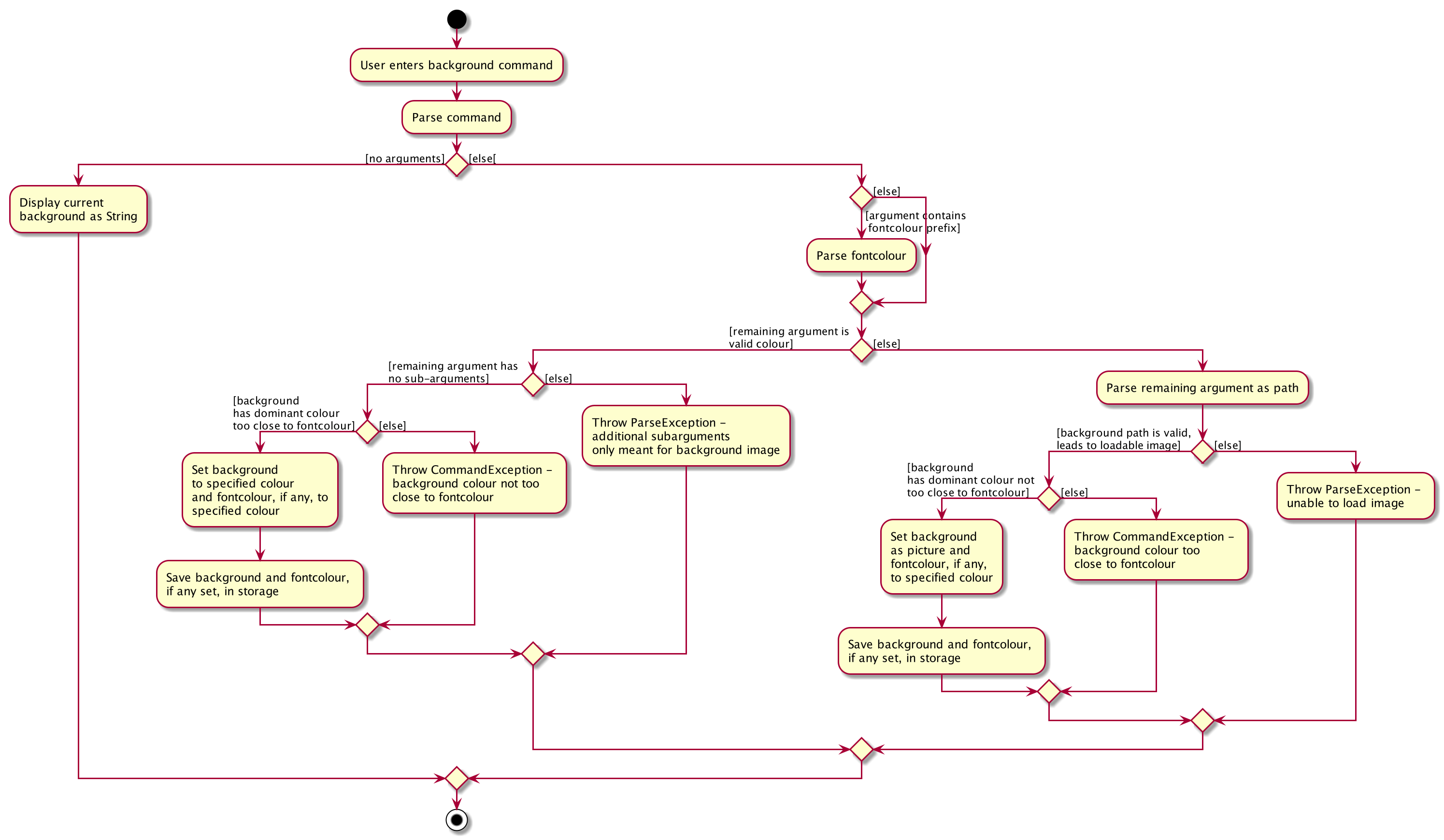
BackgroundParser first determines if the
argument received is a Colour. If so it returns a BackgroundCommand storing a Background that has a backgroundColour attribute. Otherwise, it checks, via ParserUtil , whether or not the argument before valid prefixes (preamble)
is a valid file path. If so, a Background that has a backgroundPicPath attribute is used to create the
BackgroundCommand.
-
Otherwise a
ParseExceptionis returned. -
An illustration of the logic for handling a
bgcommand is shown as follows:
-
The
ImageAnalyserclass used to determine a background image’s dominant colour is inspired, collectively, by Zaz Gmy’s code example and user mhshams's code snippet.
…(Click here for more information on the implementation of aesthetic features in the DG.)
Achievements
-
A diabetic user’s
Achievementsis supported by theachvmcommand, that displays the list of user’s achievements. Similar to howbiois implemented,SugarMummyParserreturns anAchievementsCommandthat overrides thegetDisplayPane()method to returnDisplayPane.ACHVM– such thatUiofUisets the children of theMainDisplayPanenode to be theAchievementsPane. EachAchievementis represented using anImageViewin JavaFXTilePaneso that all images are of the same size. -
When the program starts, an
AchievementsMapcontaining aMapofRecordTypetoListof allAchievementobjects that the program has is created inModelManager. -
The
AchievementStateProcessorclass is then called, which iterates through the list of allRecordelements stored inModelManagerand updates theStateof eachAchievementif necessary. -
Thereafter, for each addition and removal of
Recordelements, the same process described above is used to update theAchievementsMap, that mapsRecordTypeto anAchievementsListofAchievementelements with updatedStateattributes. -
When the
achvmcommand is received by the program, thisAchievementsMapis simply retrieved fromModelManagertoLogicManagerand the corresponding images representing theAchievementobjects in the list, with theirStatevalues, and attributes are presented to the user via theMainDisplayPaneof theMainWindow. -
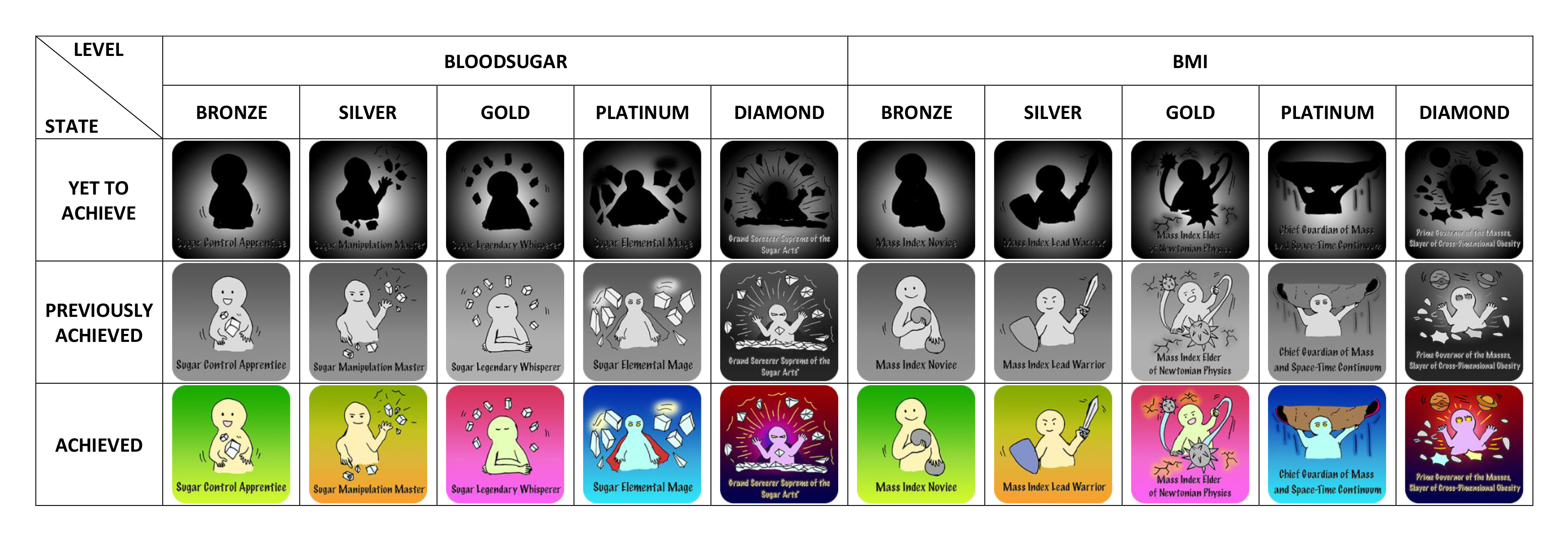
The full list of
Achievementitems, as well as correspondingStateandLevelpossible to attain for eachRecordTypein the current version of the program are shown as follows:
-
Each
AchievementStateis represented by hand-drawn images, which were coloured digitally using Adobe Photoshop. If a developer intends to modify or extend the current list ofAchievementitems, he or she may also modify or add on to these images that are currently located in/view/images/achievements/of the project directory.
…(Click here for more information on the implementation of achievement features in the DG.)
Motivation
-
Motivational aspects of the application are supported using motivational quotes.
-
Each motivational quote exists as a
Stringin an unmodifiableListof the classMotivationalQuotes. -
The
Listof quotes (collated from different sources but modified to have the same formats) are initialised to be part ofModelManagerwhen the program first starts up. -
Upon initialisation of the program, the
MotivationalQuotesLabel.fxmlfile is referenced via its corresponding class. -
Retrieval of the
Listof motivational quotes is done viaLogicManagerwhich accesses theListof motivational quotes inModelManager. -
A quote is randomly selected and then displayed to the user via the program’s user interface.
…(Click here for more information on the implementation of motivation features in the DG.)
Design Considerations
Command Classification
-
It is possible to separate the commands for
fontcolourandbackgroundinto different commands (eg.addfontcolour,editfontcolour,showfontcolour,clrfontcolour). However, this is likely unnecessary as this will not only require the end user to type more words, but also introduce redundancy (eg.clrfontcolourcould simply befontcolour blackand still achieve the same effects asclrfontcolour).
Modification of Application Style Dynamically
-
An alternative idea to achieving
fontcolourandbackgroundthroughout the entire app was to visit eachJavaFXchildNoderecursively and set the colours and backgrounds if the nodes are of specific instances with these attributes (eg.Labelwhich hastextfillattribute). However, this idea was quickly aborted as theTableViewimplemented only renders headers after the scene has been set and to include such a case in the recursive solution adds significant complexity to the program on top of the possibility of severely breaking abstraction.
…(Click here for more information on design considerations in the DG.)
Future Developments
Saving of user’s preferred themes: [coming in v2.0]
This feature has not currently been implemented, but could possibly be implemented using the existing
StyleManager class, which processes users' background and fontColour. A List could be used to save an
archive of users' preferred themes during that session.
A variable would serve as a current pointer to determine the current theme the user is using. A change in theme could
be achieved by updating the pointer and / or the HashMap, if any is implemented.
Upon termination of the program, the contents of the HashMap could be saved to a JsonStorage file.
Follow up on user’s goals: [coming in v2.0]
This feature has yet to be implemented but could possibly be implemented by first parsing inputs that the user has
entered for the Goal fields. If in a format that is recognised, the program would store the recognised
parsed Goal and corresponding LocalDate in an ArrayList and JsonStorage file. The program would then check
the user’s progress over time by analysing data in the user’s RecordList, and provide timely feedback by
comparing the current date and date by which to reach the Goal targets set.
This feature may also implement some methods from the Reminder feature so the user can choose to automatically be
reminded about his/her Goal inputs at specific time intervals desired.
…(Click here for more information on future developments in the DG.)
Appendix A: User Stories
Priorities: High (must have) - * * *, Medium (nice to have) - * *, Low (unlikely to have) - *
| Priority | As a … | I want to … | So that I can… |
|---|---|---|---|
|
very busy diabetic |
use a flexible calendar system that can account for updates |
easily make changes to appointments that I have to change often due to other commitments |
|
person who likes numbers |
see summary statistics |
better track my progress |
…(Click here for more information on user stories in the DG.)